System requirements
Quobis collaborator is designed to run smoothly on most of the actual common devices noways. Also the web client is tested with the most common browsers, but it is required to set some boundaries.
Browser versions
Regarding the PC hardware, the number of processors is the most relevant constraint. Google does not recommend less that 4 to run Chrome, so we consider this as a minimal requirement. There are coding/decoding and rendering tasks which need to be performed in real time. The amount of the RAM will depend on the number of open tabs or other external tasks being executed. We would never recommend less than 4GB for an average user which is going to use more applications, not only the browser or Web Collaborator desktop application. In order to make audio calls, you’ll need to have a microphone and a speaker installed with the appropriate device drivers. In order to make video calls, you’ll need also a webcam.
We currently support the latest version of the following desktop browsers (we strongly recommend to use the latest version of Google Chrome):
Google Chrome (recommended)
Mozilla Firefox
Microsoft Edge
Safari
We currently support the latest version of the following mobile browsers:
Safari for iOS devices
Google Chrome for Android devices (we don’t support other Chromium-based browsers)
Desktop version
The use of the desktop application is very similar to the web application version, see the Features section for detailed information. Quobis collaborator was developed with a responsive design. This means it can allow for a resizable window and can adapt itself to any screen size, resolution or aspect ratio. Therefore the application can either show a more compact view (like in mobile versions) or an extended view depending on the size of the window where it is executed.
Same hardware requirements apply than for the browser version. The supported OS for the desktop-versions of Quobis collaborator are:
Microsoft Windows: Windows 7 and later are supported, older operating systems are not supported and will not work.
macOS: minimum version supported is macOS 10.10 (Yosemite)
Linux: the app can run in a distribution depending on the included libraries of that distribution. Only Ubuntu 12.04 is guaranteed to work although the following platforms are also verified to be able to run:
Ubuntu 12.04 and newer
Fedora 21
Debian 8
Installing the application implies a similar process on each operating system. To start, double click the executable file provided:
Windows (.exe): an installation wizard will guide you through the installation process.
macOS (.dmg): the disk image will be mounted on your system and a finder window will open. Drag the Quobis collaborator application icon to your applications folder.
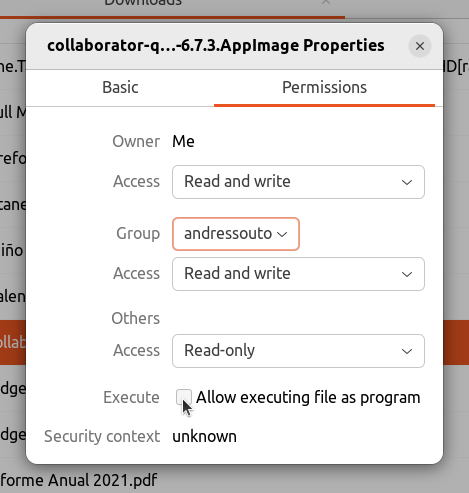
Linux (AppImage): to install An AppImage, all you need to do is make it executable and run it, there is no extraction or installation needed. Just run a
chmod +x collaborator.AppImagecommand or click on Properties-> Permissions -> Execute -> “Allow executing file as program”.
Debug mode
For troubleshooting purposes, the desktop application can be launched with its developer tools console open. This is done by setting the OPEN_DEVTOOLS environment variable before starting the executable:
Linux: open a terminal in the folder containing the AppImage and run:
OPEN_DEVTOOLS=1 ./collaborator.AppImage
macOS: setting the environment variable in a terminal and then using
opento launch the.appdoes not work, sinceopendoes not forward the variable to the application process. Instead, run the binary inside the application bundle directly:OPEN_DEVTOOLS=1 /Applications/Collaborator.app/Contents/MacOS/Collaborator
Windows: open a Command Prompt or PowerShell window in the folder where the application was installed and set the variable before launching the executable:
set OPEN_DEVTOOLS=1 && collaborator.exe
or, from PowerShell (note that, unlike in Command Prompt, running an executable located in the current folder requires the
.\prefix):$env:OPEN_DEVTOOLS=1; .\collaborator.exe
iOS version
These are the OS requirements to use the Quobis collaborator application on iOS devices:
Minimum OS: iOS 15
Recommended OS: iOS 26 or higher
Android version
These are the OS requirements to use the Quobis collaborator application on Android devices:
Minimum OS: Android 10
Supported Versions: Android 10 through Android 16
Recommended OS: Android 14 or higher for optimal performance, security, and privacy features
Note: Devices running Android 9.0 or older are no longer supported. Please ensure your device is updated to at least Android 10 to install and use the application.